Korg 01R/W – Version #62 Firmware Update Eprom Upgrade OS 01RW [Download]
€5,00
Description
Brand: Korg
Model: 01R/W
Including:
√ 2 x Binaries
√ Documentation about requirements.
Intention:
Mono Tanz provided firmware updates for Drum machines, Synthesizers, Samplers and other Music equipment for many years, both on Reverb and eBay worldwide. We have reached a point, where it is no longer worth to run a store selling eproms with firmware, on portals like Reverb and eBay, as these websites has been widely affected with local, European and international regulations to make the administration burden and existence absurd. We still want to ensure, that end-users still have the ability to update their devices, therefore is availability & knowledge very important.
This is how it works:
- After the order you will receive the Binary incl. the instructions of what Eprom(s) types you need per download link.
- You can place an order with the binary at an online-burning service, like buyicnow.com or use your own Eprom burner.
Above will not only give you a lower price point, but also higher quality than any crook-store found on eBay or Reverb etc..
Introduction:
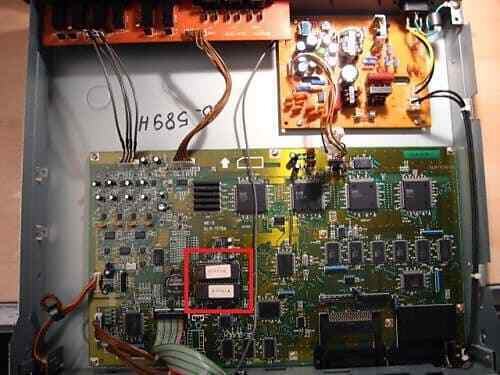
This is firmware update #62 and is the latest official released operation system by Korg Jun.01.1992. This operation system update/upgrade requires two eproms.
This version 62 upgrade isintended to iron out any remaining bugs affecting general stability and improveperformance within the firmware code.
Note: (changelog)
- Standard MIDI Files (SMF)
You can read and write Standard MIDI Files from a 720K DOS-formatted disk. “This standard makes it possible to use sequence data from a floppy disk regardless of the source equipment or manufacturer. Files of sequence data made on equipment that conforms to this standard can be loaded and played back on the 01/Wfd. In addition, sequence data created on the 01/Wfd can be saved to disk as a Standard MIDI File, making it possible to load and play back this data on other equipment as well.” NOTE: There appears to be a bug that can cause the 01 top panel buttons to stop working while using “Event Edit” on a SMF you just loaded. Click here to see details. - Disk Mode, Page 4 adds these functions:
- Load Std MIDI File* into a specific Song location (Song0-Song9). You can scroll through a list of SMFs on the disk in the drive.
- Set Date for Save* – specify a date between Jan-1-1980 and Dec-31-2079 to be stamped onto a saved MIDI file, which will appear as the DOS time stamp for that file in a disk directory.
- Save Std MIDI File*, selecting a Song location (Song0-Song9) to save, a DOS-compatible name (eight alphanumeric characters and the .MID extension), and the type of SMF, either Type 0 (single track) or Type 1 (multi-track).
- Format Disk* – formats a disk using the 720K MS-DOS format
- Loading a SMF: “you need to set track setting individually after the song name and performance data are loaded from the disk”, meaning that your volumes and programs will not be set unless you have volume controller data and/or program changes saved in the SMF.
- Saving a SMF: “Patterns are opened before they are saved. Because of this, a large portion of the disk’s memory is used when saving a Song that uses several Patterns. This may make it difficult to re-load this data to the 01/Wfd.” “Follow P2-4 if you want to carry out the 01/W series formatting procedure”. I’ve been burnt by this before. “Format Disk” is on line 4 on both the SAVE page (2) and the STD MIDI FILE page (4). You need to be sure which one you’re doing before you do it, or you’ll be frustrated when you can’t get the disk you just formatted to Save All Data…. If you have a Macintosh, you can read and write 720K MS-DOS disks using the Apple File Exchange, the PC Exchange Control Panel, or a number of other things like that.
- Expanded COMPARE key function
- If the COMPARE key is pressed while in PROG Mode or COMBI Mode, the edit recall function will call up values last set in EDIT PROGRAM mode or EDIT COMBINATION. Same thing works for Combinations. Pretty cool, and if you use it, you can save LOTS of editing time by not losing your work. Example: You edit Prog B31 into something you like, but you want to keep the original B31. You can press PROG and check Progs until you find one you don’t mind losing (like B99). You then press COMPARE to retrieve your edited B31, then press REC/WRITE to save the edited B31 into B99.
- Mute/Solo Switches Used in SEQ Mode, after recording something: Highlight the bar under a Prog number. Press and hold the A-H button below the highlighted track. Pressing a numeric button will do the following things:
0 – The track will be set to “PLAY”
1 – The track will be set to “MUTE”
2 – All tracks will be set to “PLAY”, regardless of the letter key held.
3 – All tracks except the selected track will be set to “MUTE”. This is called “solo” since you will hear only the selected track.
- Display of patterns in the event list
In SEQ Mode: “If the piece contains a pattern which consist of two or more measures, (H) is displayed in the first measure of that pattern.” This may just be errata and not a new feature. - Effects Bypass Switch Global mode Page 0 Line 1. Has an added ON/OFF parameter called “Effect SW”. When it’s set to OFF, all effects are disabled.
- NUM option for Program Change Filtering
- Global mode Page 0 Line 5. In addition to DIS, ENA, and PRG, the Program Change filter has a NUM option: “Select NUM if you do not want to change the Bank using MIDI Bank Change.”
- ROM Demo Sequence (01/W only, no FD)
- Global Mode Page 7 Line 1. (PRELOAD) has a command for “Load Demo Sequence”. This will replace any data in the SEQ mode, and the ROM programs should also be loaded, since the demo uses them
- General MIDI Bank support
- The “GM” and “GMD (GMDrum)” parameters in the bank are provided to control an external GM or other sound source. The voice and drum set used for GM are selected with the sound source corresponding to the GM sound source to which the data is sent.
- There are corrections to the MIDI Implementation charts. One updates the Device Inquiry chart to reflect the new ROM #, and the other two incorporate the fact that changes made in Program and/or Combination mode with Performance Edits (changing the attack, etc.) are valid in Edit Program and/or Edit Combination mode.
░░░░░░▒▒▒▓▓Why buy from MonoTanz?▓▓▒▒▒░░░░░░
⸎ Many years experience with Eproms and binaries
⸎ Free technical support. [English, German and Danish]
► Summa summārum: We provide a good product with confidence, transparency and honesty, which will improve the functionality of your equipment.
░░░░░░▒▒▒▓▓Important notes/Disclaimer:▓▓▒▒▒░░░░░░
⸎ This is the binary only, no eprom is included and therfore in the nature of the product, can refunds not be executed.
⸎ Backup any data you don’t want to lose before starting. Factory Reset is often required, when you replace the firmware to flush-out data from the old system.
⸎ Before buying, please check that you dont already have the same firmware version installed.
⸎ Please feel free to drop us a message here, per mail or over our Facebook Chat, if you have any problems or questions.
![Korg MicroKorg & MS-2000 – Patches & Sounds [.SYX] instant download](https://monotanz.de/wp-content/uploads/2020/02/ms2000-300x300.jpg)